


I’m constantly asked, “How do you get your images so sharp on Facebook?” BUT the real question is, “How do I minimize Facebook’s image compression?”
Well… there’s a Photoshop Action for that, and you can download it here: Free Photoshop Actions. My Exact Dimension Resize and Sharpen action is one of the 12 actions included in our free action set, This action properly converts your image from a high-res photo to an optimized web file, and is perfect for any social media platform.

Facebook allows for a maximum image size of 2048px on the longest size, but still claims that the optimal size for posting is 960px. Within the past few months, Facebook has made changes to their compression algorithm, and I noticed these dimensions were not working for me anymore.
After much trial and error, these are the dimensions that I now use:
- Landscape images – 2000px (longest side)
- Portrait images – 1600px (longest side)
When you run the Exact Dimension Resize & Sharpen action, your high-res image will be duplicated, converted to low-res and resized to the dimensions you specified. You will also see that a Web Sharpen layer has been created above the Background layer in the Layers Palette. The Web Sharpen layer opacity defaults to 50%. To ensure your image is not over-sharpened you will need to reduce the layer opacity.
When you’re ready to save your image, go to File > Save for Web. Most people save their web images a JPEGs, but I personally achieve better results on Facebook by saving my images as PNG files (PNG-24 to be exact). Below is an example:
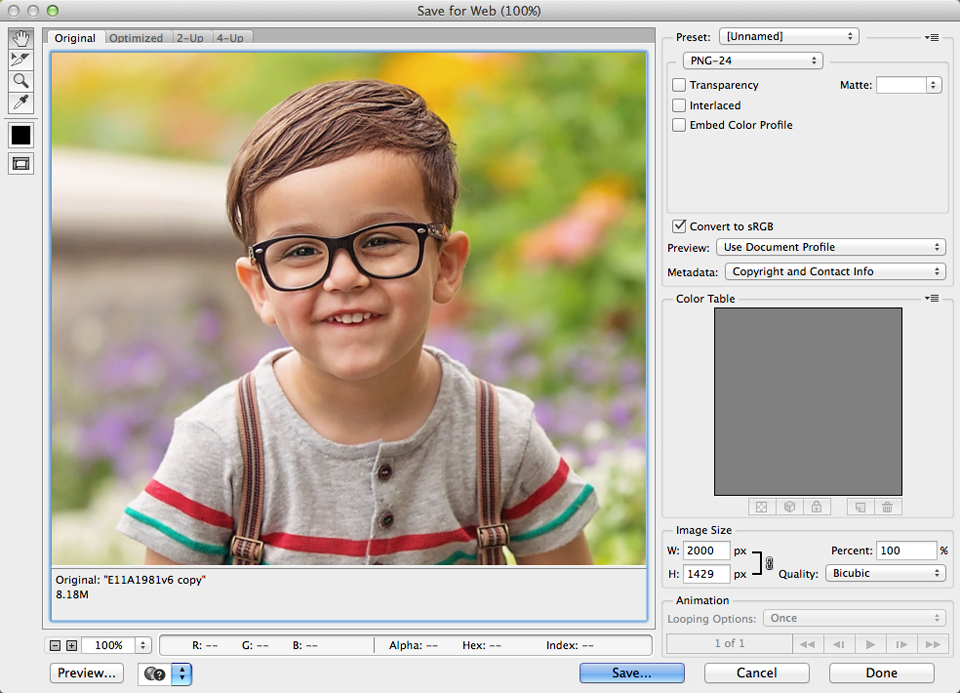
By no means am I saying that this is the only way to do this, or even the correct way; this is just my way. I have had success using these new dimensions, but I have a feeling that Facebook compression will change again in the future and I will need to update this post.
Browse our lightroom presets and our photoshop actions.
Sign up for your free Photographer.org profile where consumers searching for photographers can find photographers near me.
Here are some additional free lightroom presets at www.freelightroompresets.org/free-lightroom-presets/